Staff augmentation is no longer a backup plan. 62% of companies prefer staff augmentation to access niche expertise But productivity in distributed augmented teams doesn’t happen by default.
The difference isn’t people, it’s structure.
Without clear processes, communication, and async workflows, flexibility turns into friction.
This guide shows the productivity frameworks high-performing distributed teams use to stay aligned and deliver consistently.
Motivated and focused experts for up to 60% less than locals, delivered in days, not months
Why structured productivity frameworks for distributed teams are essential
Remote development team productivity doesn’t hold on its own. When engineers work across countries and organizations, informal coordination disappears. What used to be solved by proximity now requires well-thought-out systems.
We’d like to review the most impactful risks.
Time zones may slow things down
Time zone difference isn’t a problem by itself. The problem pops up when there’s no detailed planning, async updates, and handoff routines. Questions wait for days, feedback arrives late, and tasks get completed more slowly than they should. Structured frameworks ensure continuous progress even when the team is spread across several time zones. Without them, you face slowdowns.
Different seniority levels can throw delivery off balance
Augmented teams often consist of engineers with different seniority levels. That’s actually normal. However, without shared standards and clear ownership, delivery usually becomes uneven. Some tasks fly through, others drag on. Productivity frameworks for augmented teams help align expectations, set decision boundaries, and define quality levels, keeping everyone playing by the same rules.
Remote communication fosters misalignments
Remote teams are 50% more likely to experience collaboration challenges. The thing is that here communication is primarily written, and when messages lack context and decisions aren’t documented, there is room for misalignment. Teams have to spend more time clarifying intent instead of working on their tasks. Yet, this can be avoided with standardized communication rules and documentation practices that keep all team members aligned.
Lack of shared routines impacts team speed
When planning, updates, reviews, and other routines happen irregularly, distributed teams lose their rhythm. Context gaps appear, priorities frequently change, and delivery becomes reactive. A productivity framework built around shared routines protects team speed and reduces coordination overhead.
High-performing teams know very well that staff augmentation productivity is a system, not an accident. That’s why they design it. Clear frameworks turn their effort into results by defining how work moves, how decisions are made, and how context is preserved. Once you ignore these frameworks, stress replaces efficiency.
Framework #1. The ‘Golden Hours’ collaboration model
Time zone difference is a challenge that probably strikes your mind first when you think about distributed teams. The key point is that when your engineers can’t at least partially overlap, blockers creep in, decisions stall, and work slows down. The ‘Golden Hours’ framework solves this by creating a predefined window of real-time interaction every day.
How to implement the ‘Golden Hours’ framework
Find a daily time window where the majority of your team – internal and external – can be online simultaneously. Even 2-4 hours per day is enough if used effectively.
Schedule high-impact activities
Use the overlap hours for activities that require real-time interaction:
• Planning: Sprint planning, backlog grooming, and aligning on priorities
• Clarifications: Quick Q&A to eliminate ambiguity in tasks
• Pair programming or code reviews: Working on complex problems together
• Blocker resolution: Addressing anything that would otherwise impact progress
Assign async tasks outside the overlap
Any task that doesn’t require live collaboration – coding, documentation, testing, research – happens outside the overlap hours. This way, your team maximizes productive, uninterrupted focus time.
Share the schedule with the whole team and stick to it.
Adjust overlap as needed based on team feedback or due to return to/from daylight saving time.
Practice proves that these 2-4 hours for real-time communication make a great difference:
Delays caused by waiting for responses are reduced
Alignment across locations gets better
Team momentum is maintained while respecting individual schedules
Async work flows smoothly and uninterruptedly outside the overlap window
‘Golden hours’ is a quite simple adjustment, but when used on an ongoing basis, it ensures team efficiency and sets the stage for other engineering team management frameworks.
🎧 Listen to The Devico Breakfast Bar episode featuring Paul Foster, founder at OnePlan, to learn how to build a global team across 14 countries.
Framework #2. Async-first communication
Sometimes the distributed engineering team's productivity is low because too many things wait for real-time answers. While live communication is valuable, organizing a workspace based on async-first communication can be of great help for augmented teams. This strategy prioritizes non-real-time, written, or recorded updates over immediate, live interactions. This, in turn, reduces meeting fatigue, supports remote work, and encourages focused work.
How does it work? There is a range of practices, by implementing which, you can consider your team async-first:
1. Clear written specs
Forget about relying on memory or verbal agreements. Every task should start with clearly written requirements, acceptance criteria, and background context. This way, engineers can confidently pick up work, even hours later, without waiting for clarifications. This removes interpretation gaps, reduces back-and-forth questions, and prevents rework caused by assumptions.
2. Decision logs
You might know from your experience that decisions that live only in chats or meetings easily get lost. Async-first teams document in a shared space what was decided, why it was decided so, and who signed off - at least for critical decisions. This keeps everyone on the same page, saves time, and simplifies the onboarding of new engineers.
3. Loom walkthroughs
Not to pull everyone into a meeting, teams record short Loom videos to explain designs, code changes, workflows, etc. These walkthroughs contain nuances that text alone can’t capture. People can watch and respond with feedback when it fits their schedule.
4. Short written standups
Have you ever thought about moving daily standups to text? Some distributed teams have already used this in practice, following a simple structure:
This approach keeps updates visible, reduces the number of meetings, and helps managers discover risks early. The main thing – no one is blocked because of missing a call.
4. Async approvals
Members of async teams don’t wait for an upcoming meeting to get an approval because reviews, along with approvals happen in tools. Pull requests, design proposals, and feedback loops move forward without meeting dependency. This keeps delivery seamless and prevents delays.
Though very effective, those practices alone aren’t enough. High-performing distributed teams also integrate guardrails that prevent async chaos:
Response SLAs
Set clear expectations from the outset. This helps to avoid anxiety and constant checking. For example:
Critical blockers: immediate response.
Escalation channels
Sometimes, written communication stops being effective. Prepare clear rules for when this happens. For example, if an issue blocks delivery, introduces risk, or starts looping without resolution, it should be immediately moved to a real-time channel, be it a quick call, huddle, or dedicated escalation chat.
Single source of truth
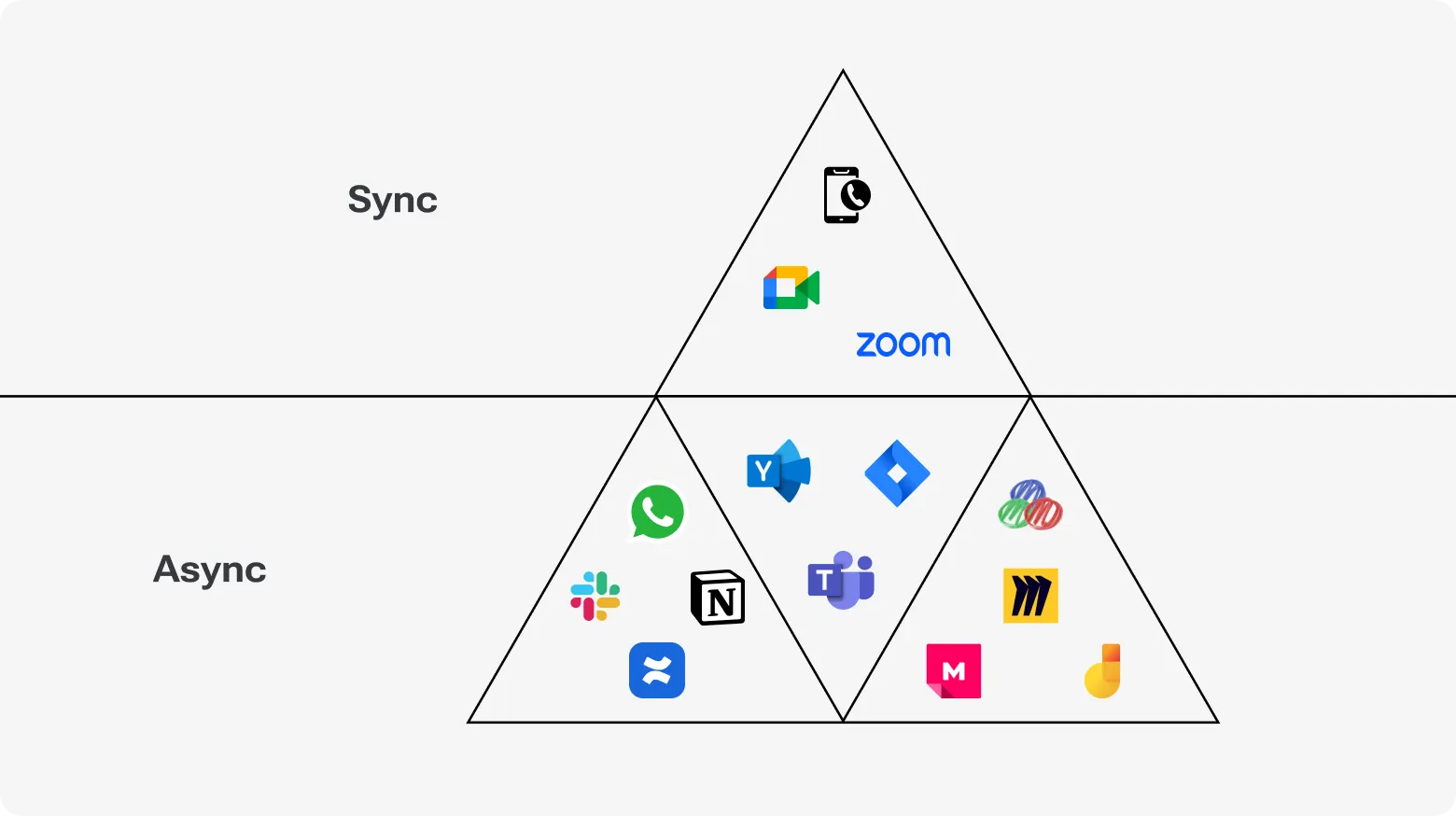
18% of remote engineers report that too many tools in place make collaboration difficult. That’s true. When information is stored just anywhere, expect trouble. High-performing teams intentionally limit where data goes. Let’s say:
Jira or Linear for tasks and ownership
Confluence or Notion for requirements, decisions, and long-term context.
This eliminates knowledge loss in DMs, reduces questions, and ensures everyone works from the same shared reality.
It may seem that async collaboration frameworks aim at minimizing collaboration. Yet, their purpose is fewer interruptions, better context, and decisions that don’t disappear.
Framework #3. The ‘Two Layers of Ownership’ model
Efficiency suffers when ownership is split vaguely. When everyone is partly responsible, no one really is. Actually, 70% of remote employees feel unclear about what is expected of them, leading to frustration and decreased productivity. The Two Layers of Ownership model helps set clear expectations and goals by clearly separating execution ownership from product ownership. So, there are two key ownership layers:
Layer 1: Vendor team owns execution
The vendor team should work as a self-contained delivery unit. Therefore, their ownership goes beyond completing assigned tickets.
In practice, this means:
Engineers clarify requirements before getting down to work, not halfway through it
Tasks are broken down to ensure the visibility of daily progress
Quality checks (tests, reviews, refactoring) aren’t optional
Local tech decisions are made without waiting for approval on every detail
If something blocks progress, the vendor flags the problem early and with full context.
Thanks to this layer, work flows without frequent client intervention.
Layer 2: Client leadership owns the product
There should also be someone accountable for the product, and this is leadership on the client side.
As a rule, their role is to:
Prepare a clear plan and define priorities
Write and clarify acceptance criteria
Decide on trade-offs between scope, time, and quality
Make other product and business decisions
They don’t monitor how an augmented team writes code. Instead, they focus on ensuring it develops the right things within a predefined timeframe.
What benefits the model brings
The appropriate ownership separation ensures quick decision-making and simplifies everyone’s work. Companies that adopt it take advantage of:
Client’s leadership doesn't need to check progress daily, as ownership at the vendor level keeps execution moving without additional oversight.
Everyone knows what they are accountable for. Fewer gray areas result in fewer last-minute surprises.
The model helps to spot issues early, not during final reviews. That keeps timelines realistic as well as fosters trust between the client and vendor.
How to understand if the model works
We offer you to use this quick checklist to check if the model has been correctly set up. If not all answers are positive, you need to tweak ownership boundaries.
-
Does every task have a single execution owner on the vendor side?
-
Are risks and blockers voiced early with impact and options?
-
Are quality issues handled without the client stepping in?
-
Are acceptance criteria clear before work starts?
-
Are product decisions made by one clearly named client owner?
Also, you may know the model adoption is successful when an augmented team stops feeling like external help and starts working as an autonomous delivery engine you can count on.
Framework #4. Sprint Discipline 2.0 for distributed teams
Messy sprints are dangerous for both distributed augmented teams and co-located teams. In the first case, the consequences are just more significant and quicker. Vague tasks, constantly changing priorities, inaccurate estimates, and other complications of poorly disciplined sprints create blockers and slow down work.
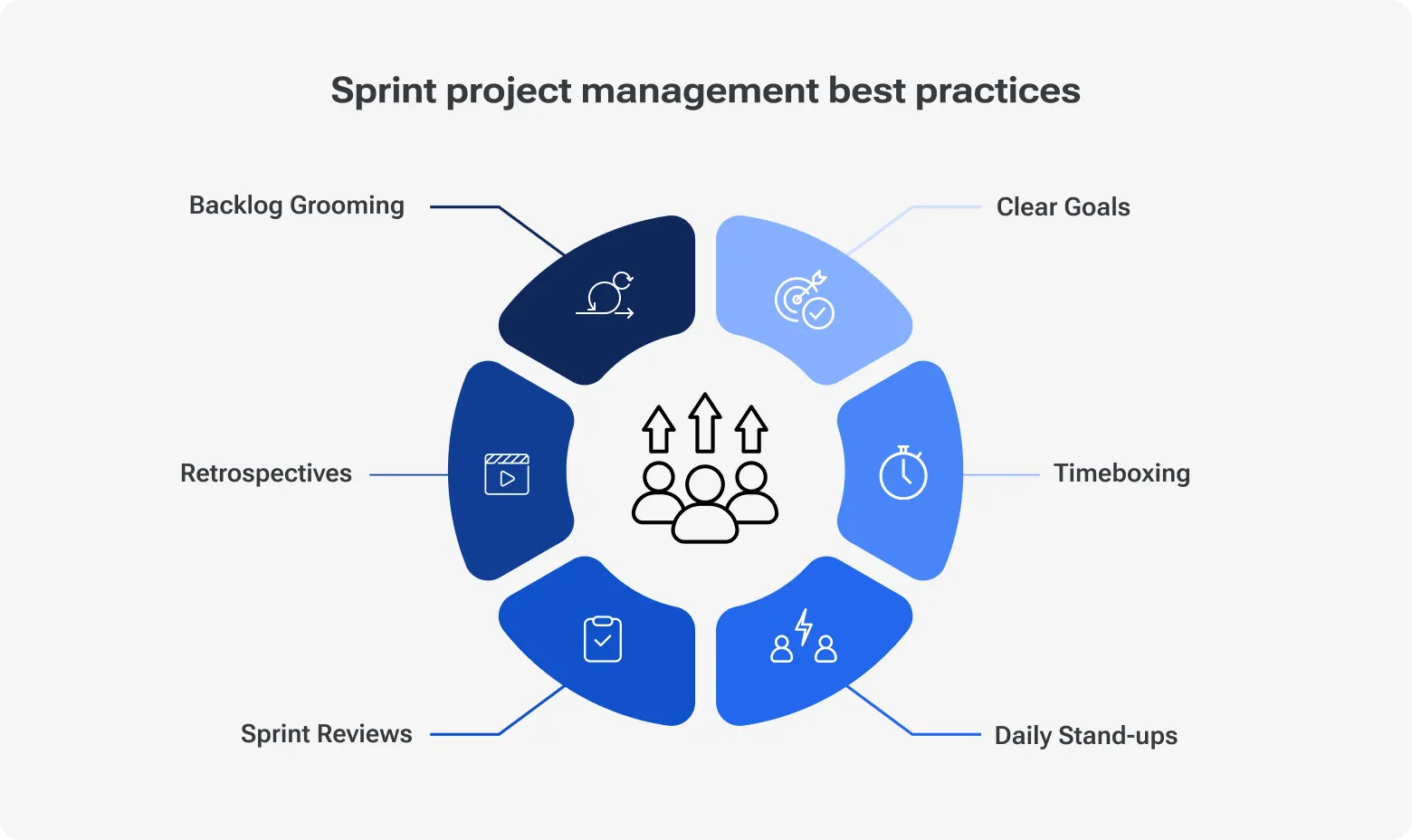
Sprint Discipline 2.0 stands out among other collaboration frameworks for remote teams thanks to providing a clear pipeline that keeps delivery stable.
To implement it correctly, you need to know its key elements:
1. Clear grooming
The key rule here is that no ticket can enter the sprint half-baked. Each one should have:
Spelled out acceptance criteria
Outlined dependencies and context
For distributed teams, a ready ticket isn’t one roughly described but fully actionable. This way, engineers know exactly what to do from day one.
2. Smaller, predictable tasks
Large tasks take energy and derail motivation. So, break work into chunks that can be completed in 1–3 days. Smaller tasks:
Make daily progress visible
Keep morale high, because team members see accomplishments
3. Strict estimation rules
When estimates are reliable, a plan is a plan, not a wish list. That's why everyone should estimate using the same scale (story points, hours, or T-shirt sizing). Consistency here is a must.
4. Daily async blockers reporting
It’s a good practice to report blockers asynchronously in a shared space each day. Your team can use the following report structure:
Offered workaround (if any)
5. Mid-sprint review
We strongly recommend you check progress halfway through the sprint. Make sure tasks are on track, estimates hold, and priorities don’t shift in the blink of an eye in order to prevent unpleasant surprises at the end.
6. End-of-sprint demos & lessons learned
Last but not least: wrap every sprint with a short demo of completed work and a discussion of lessons learned. Go through what went well, what slowed the team, and you can tweak for the next sprint. This practice promotes continuous learning and prevents the same mistakes from repeating.
Discipline 2.0 isn’t bureaucracy. It’s about creating clear workflows that help teams stay focused and productive irrespective of time zone.
Framework #5. The Hand-Off System (HOS) for multi-time-zone teams
Lost context is the biggest risk of multiple time zones. When work is juggled between different locations without a proper hand-off, teams have to reconstruct intent and recheck decisions, which takes valuable time. The Hand-Off System (HOS) serves to prevent that. Its goal is to enable a team to start immediately after another team signs off.
Here are a few practices that help to introduce the HOS:
1. Standardized hand-off notes
Make an end-of-day hand-off a routine for teams in all time zones. There is no need for essays or improvisation, as a good hand-off answers just three questions:
What needs attention next
A standard structure lets teams avoid decoding someone else’s style. They just scan, gain the context, and move on.
2. PR summary templates
Quite often, pull requests stay behind time-zone friction. The HOS fixes this through a short PR summary that explains:
What was changed (at a high level)
What problem the change solves
Anything reviewers should know additionally
This approach dramatically cuts review cycles, optimizing outsourcing team productivity in general.
3. Loom recordings for complex logic
Some things – let’s say sophisticated logic, architectural changes, or tricky edge cases – are just faster to explain out loud. In this case, teams can add a short Loom recording. A five-minute video can save hours of async back-and-forth. Don’t ignore this practice, as stat shows that teams that use multimedia communication like video and audio messaging are 50% more effective.
4. The ‘morning catch-up bundle’
Encourage your teams to prepare a single morning bundle for the next time zone that would include:
This way, the next team can start their working day with everything needed in one place.
The HOS is definitely one of the best practices for distributed developers. With standardized hand-offs, multi-time-zone work is less troublesome. Delivery gets stable, context stays intact, and no one spends their morning figuring out what happened overnight.
Framework #6. Quality Gates for remote teams
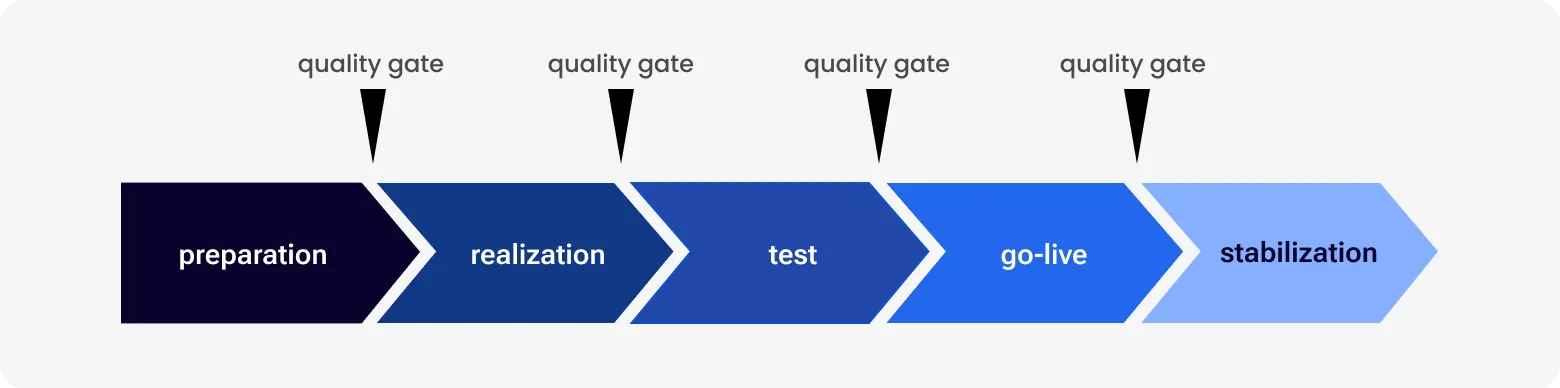
In distributed augmented teams, quality issues rarely come from a lack of skill. Far too often, the reason is different standards applied at different moments. Quality Gates address this by introducing clear checkpoints that work must pass before it moves forward. The goal is to verify quality continuously, not at the finish line.
Quality gates across the software delivery lifecycle
What can serve as quality gates? Here are a few that you can use:
1. Ticket acceptance criteria
Quality starts before the first line of code is written. Every ticket must have clear acceptance criteria. If a requirement is ambiguous, it shouldn’t enter development. Follow this rule, and you’ll prevent a ton of rework caused by misinterpretation.
2. Code review checklist
A short, shared checklist can make code reviews more efficient. Make sure to include the following checks:
Readability and maintainability
Performance or security implications
Such a checklist is the best way to ensure predictable and fair feedback, especially when reviewers rotate across time zones.
3. QA validation
While quality should be a shared responsibility, there should be a dedicated QA role to handle thorough QA validation against acceptance criteria. Nothing should be considered completed unless QA validation has been executed.
4. Automated tests
Automated unit, integration, or regression tests validate software behavior without waiting for human review. This reduces feedback time by up to 97%. Invest in automated testing to avoid trouble in production. If tests fail, don’t let the work move forward without exceptions.
5. CI/CD verification
Every change must pass through a shared delivery pipeline before it can be merged. The pipeline automatically assembles an app from scratch, installs dependencies, and runs predefined checks to confirm the change works within the existing system. This ensures that code works not only in isolation but also integrates reliably in a standardized environment, which is a critical safeguard for distributed teams.
6. Documentation update requirement
Your documentation should reflect all changes. This refers to API docs, setup instructions, and decision notes. For remote teams that rely on written context, outdated docs pose serious risks that can cost time and money.
Framework #7. Delivery Performance Metrics (simple, not corporate)
Even if everyone is busy and calendars are full, delivery performance shouldn’t be assessed based on intuition. What you need is tracking delivery metrics, which is one of the key offshore team productivity strategies. Used correctly, it helps make progress visible without adding pressure.
Here are the indicators that deserve your attention.
1. Cycle time
Cycle time shows how long it takes for a task to get completed. If it increases, it’s important to understand if it’s because of speed, unclear requirements, hidden dependencies, or waiting time between steps.
2. PR merge time
Pull requests that linger slow down delivery. Long merge times usually indicate overloaded reviewers, unclear ownership, or review standards that aren’t shared. Tracking this metric highlights process bottlenecks without singling anyone out.
3. Bugs per release
Notice an increase in post-release bugs? It is a signal that quality checks are executed too late or not properly. This metric links delivery outcomes to upstream practices such as grooming, reviews, and testing, where fixes are cheaper and easier.
4. Predictability (planned vs. completed work)
This metric lets you understand if the team delivers what it committed to. When predictability is low, you face unrealistic planning or mid-sprint changing priorities. Over time, this data helps teams plan more accurately and confidently.
5. Blocker resolution speed
Like it or not, blockers are a part of distributed work. The key question here is how quickly they are resolved once raised. Slow resolution is often a result of centralized decisions, unclear ownership, or inappropriate handoffs.
6. Knowledge concentration risk
When only one or two people on the team possess critical knowledge, delivery becomes fragile. This metric helps identify areas where context needs to be shared before it turns into a risk. Again, documentation, pairing, or recorded walkthroughs are of great help here.
The best thing about delivery performance metrics is that they don’t suggest daily control. Periodical reviews and open discussions are what you need. The goal isn’t to ask who is guilty of a problem, but to find out where the flow creates friction. Done right, metrics replace assumptions with clarity and keep distributed teams aligned without constant oversight.
Framework #8. The ‘Shared Brain’ documentation protocol
Above, we’ve talked a lot about the importance of knowledge transfer and the danger of knowledge gaps. Documentation in this context is critical. Therefore, our list of productivity systems for engineering teams wouldn't be complete without the ‘Shared Brain’ protocol that focuses on making documentation as efficient as possible.
With its help, knowledge is accessible anytime to everyone who needs it. As a result, teams don’t depend on who happens to be online, awake, or still around.
Here’s what actually makes it work.
1. Architecture docs
Docs of this kind should contain just enough data to explain how the system hangs together and where the sharp edges are. This way, when someone touches a component, they immediately know what else might break. That alone saves tons of time.
2. Onboarding maps
New engineers should get up to speed quickly. An onboarding map helps with this by answering the basic questions upfront:
Which parts of the system deserve extra caution?
It shortens this phase from weeks to days.
3. Feature decision history
Every product has features that look strange unless you understand the trade-offs behind them. Writing down why decisions have been made prevents the same debates from repeating and stops teams from fixing things that were intentionally designed that way.
4. Reusable tech specs
Instead of reinventing explanations every sprint, teams should keep lightweight specs for recurring patterns. As a result, when similar work comes up again, the context is already there, and the team takes advantage of fewer explanations, fewer misunderstandings, and faster starts.
5. Coding standards
Clear standards remove guesswork. Engineers don’t have to wonder what ‘good’ looks like in this codebase – they already know. As a bonus, reviews get faster and less emotional.
6. Troubleshooting guides
When something breaks at 3 a.m. in someone’s time zone, a written playbook is helpful. Known issues, common failure points, and steps to try can turn panic into a routine fix.
Thanks to the ‘Shared Brain’ protocol, managing augmented teams is easier as questions are answered once instead of ten times.
Final thoughts. Productivity comes from clarity, not pressure
Managing augmented teams isn’t harder, it’s different. Don’t force in-house habits onto distributed teams. Design for how they actually work.
A few rules that matter:
Standardize communication and handoffs
Default to async, use sync intentionally
With the right frameworks, distributed augmented teams can be as productive — or more — than in-house ones, without micromanagement or 24/7 control.
At Devico, we help teams use staff augmentation deliberately, with frameworks that keep delivery predictable and overhead low. If you want augmentation to accelerate your roadmap, not complicate it, we can help.
Great software starts with great people